 PLAY
watchOS 27: Which Apple Watch Models Are Supported? (Check Before You Buy Used)
By Playloot Team · Nov 10, 2026
Apple's watchOS 27 is the first update in years to cut a long list of Apple Watch models in one go. If you are buying a second-hand Apple Watch in India, this matters more than any spec sheet: it decides which watches keep getting new features and which ones stay where they are. Here is the full list and what it means for your money.
Table of Contents
Apple Watch Models That Get watchOS 27
- Apple Watch Series 9
- Apple Watch Series 10
- Apple Watch Series 11
- Apple Watch Ultra 2
- Apple Watch Ultra 3
- Apple Watch SE (3rd generation)
Apple's first compatibility list wrongly left out the Series 9; Apple later confirmed that the Series 9 is supported.
Apple Watch Models That Do NOT Get watchOS 27
- Apple Watch Series 8
- Apple Watch Ultra (1st generation)
- Apple Watch SE (2nd generation)
- Apple Watch Series 7, Series 6 and older
Does an Unsupported Apple Watch Stop Working?
No. A Series 8 or first-generation Ultra keeps working exactly as it does today on watchOS 26: notifications, calls, workouts, heart rate, sleep tracking, Apple Pay and its existing apps all carry on. What it will not get are the new watchOS 27 features, and over time some new third-party apps may require a newer watchOS. Apple has historically shipped some security fixes for older versions for a while, but it does not promise them.
What This Means If You Are Buying a Used Apple Watch
| If you want… | Choose | Why |
|---|---|---|
| The longest software support | Series 10 or Series 11 | Newest chips, thinnest design, full watchOS 27 support |
| Best value with watchOS 27 | Series 9 | Cheapest watch that still gets watchOS 27, plus double tap and on-device Siri |
| Rugged outdoor watch with watchOS 27 | Ultra 2 | Brighter screen and watchOS 27 support; the Ultra 1 misses out |
| The lowest price for basics | Series 8 | Fine for fitness and notifications if you do not need new features, and it should cost noticeably less |
Our simple rule: if your budget stretches to a Series 9, buy at least a Series 9. The price gap between a used Series 8 and Series 9 is usually small compared with the years of extra updates you get. Browse tested pre-owned models with warranty in our Apple Watch shop, and see the detailed Ultra 2 vs Series 10 comparison if you are choosing between those two.
Already Own a Series 8 or Ultra 1?
You do not need to rush. If the watch does everything you need, keep using it. If you want the new features, this is a good moment to upgrade, because resale values of unsupported models tend to fall over time. Get an instant quote for your Series 8 or Ultra with free doorstep pickup, and put it towards a newer model.
How to Check Your Apple Watch Model and watchOS Version
- On the watch, open Settings > General > About. You will see the model name and the watchOS version.
- On your iPhone, open the Watch app > General > About for the same details.
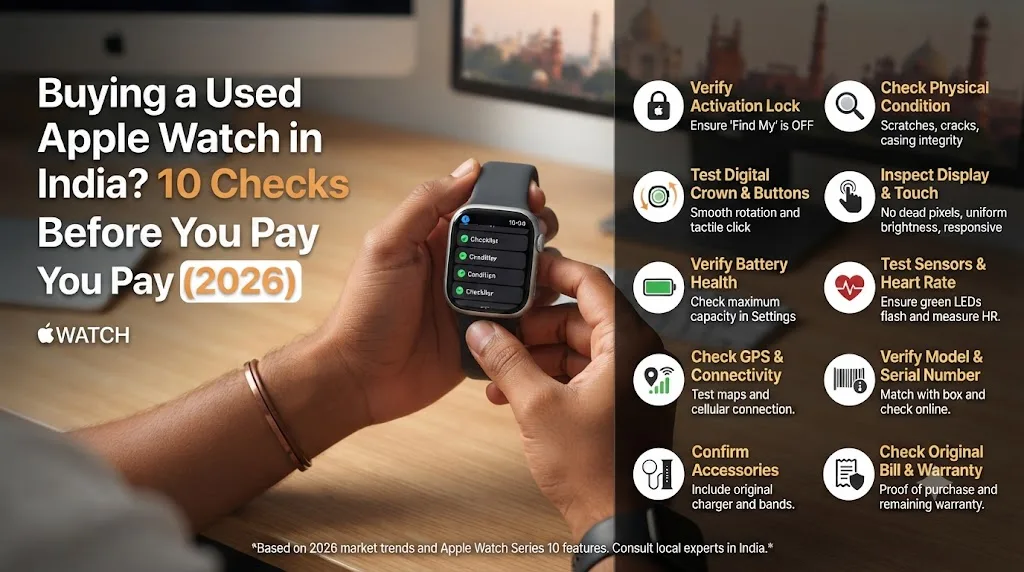
- When buying used, ask the seller for a screenshot of this screen, or check it yourself before paying. Our used Apple Watch buying checklist covers everything else to inspect.
Frequently Asked Questions
Does the Apple Watch Series 8 get watchOS 27?
No. The Series 8 stays on watchOS 26. It keeps working normally but will not receive watchOS 27 features.
Does the Apple Watch Series 9 get watchOS 27?
Yes. Apple corrected its initial list and confirmed that the Series 9 supports watchOS 27.
Does the first Apple Watch Ultra get watchOS 27?
No. Only the Ultra 2 and Ultra 3 get watchOS 27.
Is it still worth buying a Series 8 in 2026?
Only at a clearly lower price than a Series 9, and only if you mainly need fitness tracking and notifications.
Which is the cheapest Apple Watch that supports watchOS 27?
The Apple Watch SE (3rd generation) is the cheapest new option; on the used market, the Series 9 usually offers the best value.
Compatibility as announced by Apple and reported in June 2026. Information is current as of November 2026.