PLAY
PLAYBuying a Used Apple Watch in India? 10 Checks Before You Pay (2026)
By Playloot Team · Oct 23, 2026
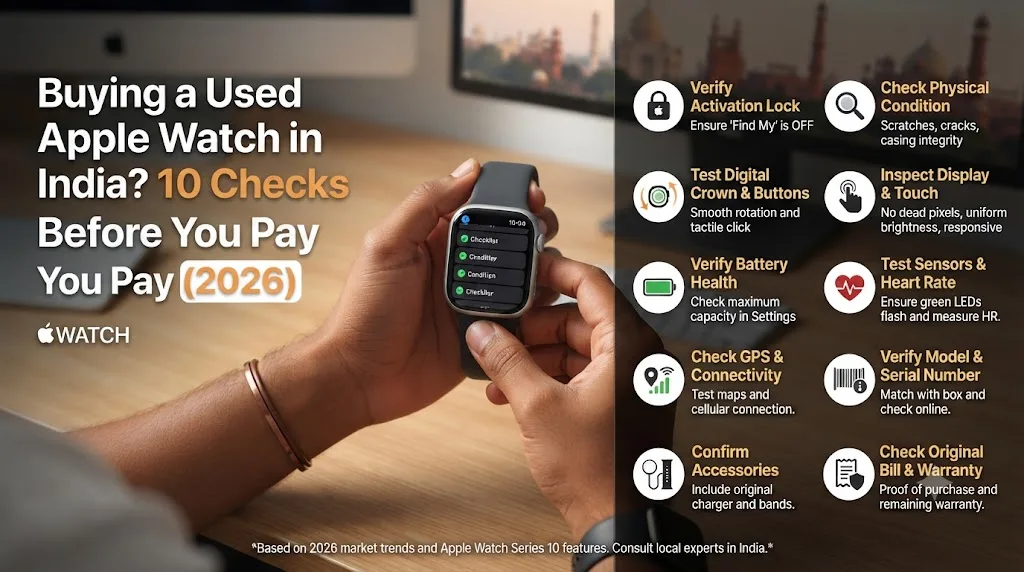
Apple Watch Series 12 went on sale in India on 18 September 2026 at ₹56,900, and every upgrade season does the same thing to the second-hand market: thousands of Series 9, 10 and 11 watches suddenly appear on OLX, Facebook Marketplace and Instagram. That is great news if you want an Apple Watch for half the price. It is also when buyers get caught with locked watches, tired batteries and convincing fakes. Run these 10 checks before any money changes hands.
Table of Contents
- 1. Make Sure Activation Lock Is Off (the Most Important Check)
- 2. Check Battery Health
- 3. Confirm the Exact Model and Size
- 4. GPS or GPS + Cellular?
- 5. Run the Serial Number on Apple's Coverage Site
- 6. Rule Out a Fake
- 7. Test Every Button and Sensor
- 8. Inspect the Screen and Case Closely
- 9. Check the Charger and Accessories
- 10. Ask for the Bill, and Be Wary of Prices That Are Too Good
- The Easier Way: Buy Tested
- Frequently Asked Questions
1. Make Sure Activation Lock Is Off (the Most Important Check)
An Apple Watch that is still linked to the seller's Apple ID is useless to you: you cannot set it up without their password. Ask the seller to unpair it from their iPhone in front of you (Watch app > All Watches > info button > Unpair Apple Watch). Then pair it with your iPhone before you pay. If it asks for someone else's Apple ID password at any point, walk away.
2. Check Battery Health
On the watch, go to Settings > Battery > Battery Health. Above 85% is good; below 80% means a noticeably shorter day and a battery replacement soon. A watch with unusually weak battery health for its age has usually been charged heavily or kept hot. Battery is the most expensive wear item, so price it in.
3. Confirm the Exact Model and Size
Listings often say "Series 9" when the watch is a Series 8, or "45 mm" when it is 41 mm. On the watch, open Settings > General > About and note the model name and model number. You can also read the case size engraved on the back. Make sure it matches what you are paying for.
4. GPS or GPS + Cellular?
Cellular models cost more and let the watch make calls without your phone (with a supported Jio or Airtel plan). A cellular watch shows cellular settings in the Settings app; a GPS-only model does not. Do not pay the cellular premium for a GPS watch.
5. Run the Serial Number on Apple's Coverage Site
Copy the serial number from Settings > General > About and check it at checkcoverage.apple.com. It confirms the exact model and shows whether any Apple warranty or AppleCare+ is left. A serial that does not match the model in the listing is a red flag.
6. Rule Out a Fake
Clone "Apple Watches" sold online can look identical in photos. A genuine Apple Watch pairs through the Watch app on an iPhone and runs watchOS. A fake cannot pair this way and uses a different companion app. If the seller will not let you pair it, assume it is fake.
7. Test Every Button and Sensor
- Digital Crown: scroll smoothly and press. It should not stick or click unevenly.
- Side button: press for Control Center or the Dock.
- Heart rate: open the Heart Rate app and wait for a reading.
- Speaker and mic: ask Siri something and play a sound.
- Haptics: you should feel a firm tap on notifications.
- Touch screen: swipe across every edge.
8. Inspect the Screen and Case Closely
Hairline scratches on aluminium models are normal and do not affect anything. Look instead for cracks, dead pixels, and a screen that is lifting from the case. A lifting screen often means a swollen battery, which is a safety issue: do not buy that watch.
9. Check the Charger and Accessories
A missing original charger costs a few thousand rupees to replace, and cheap chargers can charge slowly or run hot. Factor any missing strap, charger or box into the price.
10. Ask for the Bill, and Be Wary of Prices That Are Too Good
An invoice helps with any remaining warranty and proves ownership. A Series 10 or 11 listed far below everyone else's price is usually locked, stolen, damaged or fake.
The Easier Way: Buy Tested
Every pre-owned Apple Watch on Playloot is checked for all of the above before it is listed: Activation Lock removed, battery health measured and shown on the listing, sensors and buttons tested, and covered by a Playloot warranty on eligible models. Browse tested Apple Watches, or read our Apple Watch Series 11 second-hand price guide. Upgrading to Series 12? Get an instant quote for your old watch.
Frequently Asked Questions
How do I check if a used Apple Watch is locked?
Pair it with your own iPhone before paying. If setup asks for another person's Apple ID password, Activation Lock is still on and the seller must remove it.
What battery health is good on a used Apple Watch?
85% or higher is good. Below 80% means shorter battery life and a likely battery service soon.
How can I tell a fake Apple Watch?
A genuine Apple Watch pairs with an iPhone through Apple's Watch app and shows a serial number that matches on checkcoverage.apple.com. Fakes cannot do either.
Is a used Apple Watch worth it after Series 12 launched?
For most people, yes. Series 10 and 11 share most of Series 12's everyday features and cost far less pre-owned. Series 12's main additions are the new Health Sensing System and Readiness score.